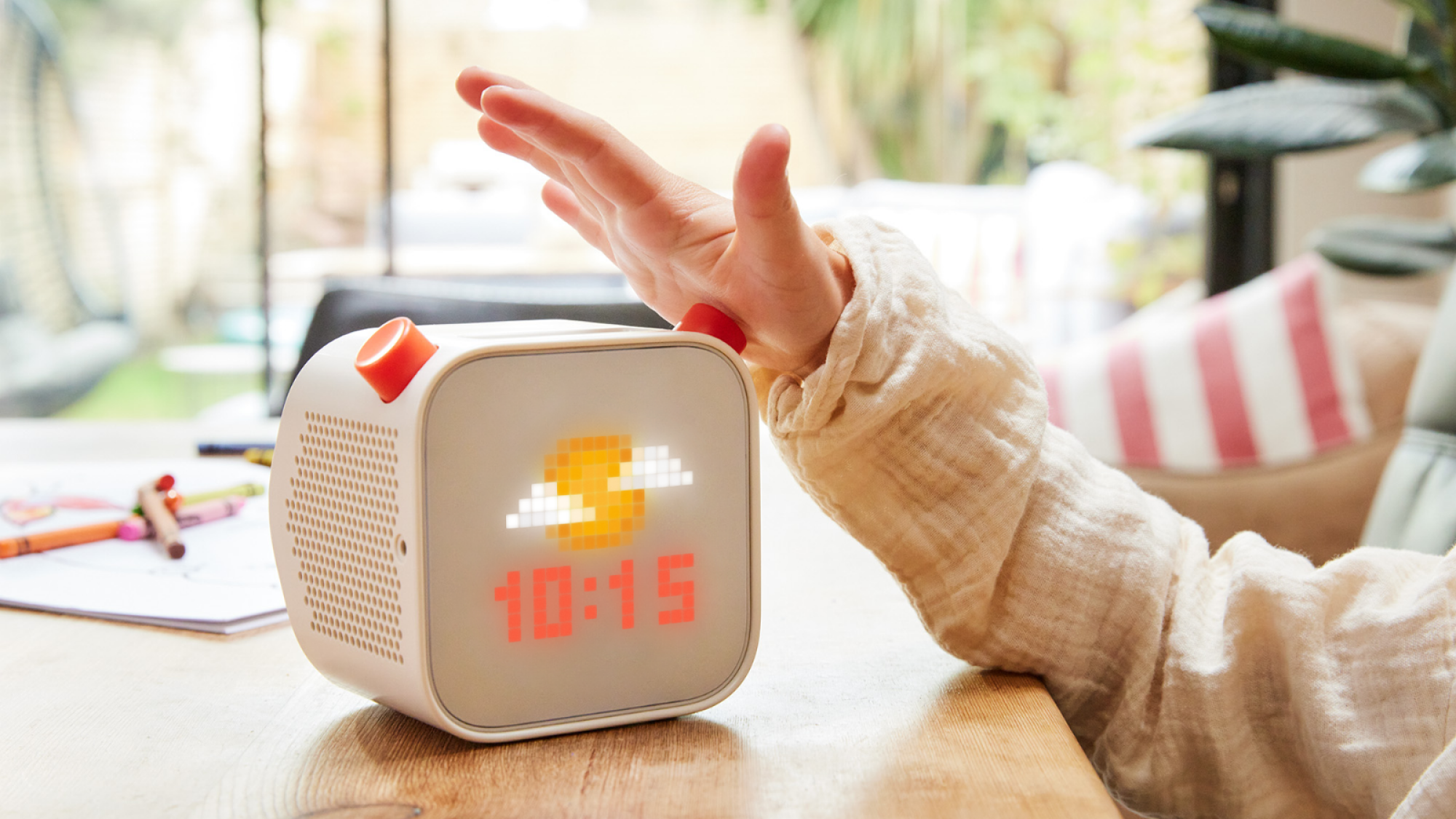
My family recently bought a Yoto for our son’s birthday. Some of our friends mentioned enjoying it for their kids, and it had come recommended elsewhere (including the Mere O Discord server). Yoto has a great library of short stories, songs, and audiobooks for listeners of all ages.
As part of its offering, Yoto also sells ‘Make Your Own’ cards. These cards can be loaded with up to 99 tracks of audio. That’s where I want to direct my attention in this piece–Christian families will be greatly helped by this little device for its simple and convenient opportunity to help conduct catechesis. (This post is not sponsored by Yoto nor am I receiving any commissions from them.)
Why the Yoto?
Before I share my process, let me answer a preliminary question for those unfamiliar with the Yoto. Why bother with it? What’s the difference between it and, say, playing an audiobook or a podcast on Spotify with your phone?
From my experience and understanding, the Yoto is different and better because of how differently it presents to parents and kids. To parents, it’s obviously a digital technology–WiFi enabled, uses NFC cards, requires phones to connect, offers a subscription with streaming options, and is mostly controlled via mobile application. But for kids, it’s an analog experience. To my son, the Yoto is not Mom or Dad’s phone, he can only push three buttons on it, there’s no touch screen or moving pictures, he has to put a card in the slot for it to play music or stories, and he can carry it around (unlike Mom and Dad’s phones). The simplicity of the Yoto as a kind of alternative neo-analog device is exactly why we enjoy it so much.
Anyone raising kids in the Year of Our Lord 2026 is doing so in the shadow of harmful digital technology. As we try our best to raise our kids, it’s become increasingly clear that part of our task is to strive toward a generational weaning from our dependency on mobile devices. Any tool or feature we can take away from the iPhone is, for us, a win. With the Yoto, my wife and I reap the benefits of the convenience of digital technology (to upload custom playlists and adjust settings, for example) while our son reaps the benefits of it as an “analog” medium. And the medium, as they say, is the message.
Given that, here’s my recommendation: if you have young kids, get the Yoto. It’s better than an iPad because it requires attentive listening without an addictive screen. It’s intuitive, easy for kids to use, and can be set up in the background for kids to listen to. Kids can stream the Yoto Daily Podcast, play a music card, or listen to an audiobook–it’s great.
But for the Christian family, here’s the cherry on top: This is a prime opportunity to set a vision for discipleship in your home and to carry it out.
My Family’s Process
Buy a Yoto.
We started by purchasing a Yoto from a nearby Target. Each Yoto comes with a Make Your Own card and this Target happened to only have Laurie Berkner song cards on the shelf, so our son started without any story cards.
Set a vision for discipleship in your home.
Our family has adopted a vision for discipleship in our home, thanks to many people and resources, but especially folks writing about this today like Adam Griffin, Danielle Hitchen, and Justin Whitmel Earley, among others.
This vision is especially situated around a rhythm of three things: (1) the reading of Scripture; (2) traditional Christian catechesis through the Apostle’s Creed, the Ten Commandments, and the Lord’s Prayer; and (3) keeping time with the church calendar. We also make a serious effort to read good literature to and with our kids, to include classics like Aesop’s Fables and Mother Goose, and relatively newer works like Curious George, Little Blue Truck, and whatever the library may have available on a given day.
Buy books, borrow books, get creative, collect songs & stories.
The next step in our process was to gather stories and songs that we aspire to be the heart and soul of our home’s collective imagination. This is essential because it makes my wife and I the active curators for our children, instead of the passive consumer of whatever Walmart’s marketing team or Meta’s algorithm pushes. What I mean by that is, if we aren’t making an effort to pursue our vision for discipleship, especially through stories, it will be far too easy for us to simply receive what Amazon or Walmart or The Algorithm is pushing at any given time.
In other words, we began to build a family library that is at the service of our family’s vision for discipleship. We save websites, resources, links, videos, and conference materials. We occasionally print off what we can, and put it in a place we know we will remember it. We have been blessed in that our oldest was the firstborn grandchild for both my side and my wife’s side of the family, so we have plenty of books. Our aim has been to cultivate interest, active listening, and patient attention so that we can nourish our kids’ wonder and imagination. All of that comes with reading, telling stories, and singing together.
As an example, we are now the proud owners of three entries in Lexham Press’s For All God’s Children Series. These books serve as concise and easy-to-follow teachings on the Apostle’s Creed, the Ten Commandments, and the Lord’s Prayer.
Read and sing to kids.
Naturally, after setting a vision and accumulating stories, we read and sing them to our children. On Sundays, we make a special effort to read the For All God’s Children series and to memorize these foundational parts of the Christian faith. As I’ve read to my kids, I’ve gotten more comfortable reading at different paces and tones that suit the book being read. It’s been especially helpful to find the places where I can pause and look over to my son and expect him to “fill in the blank.”
Try recording some things by yourself.
Here’s where we get into the actions that actually involve the Yoto. After nurturing some familiarity with the books we love, I have started to record myself reading them so they can be added to the Make Your Own cards. Oftentimes, I’ll also read a chapter of Scripture verbatim where I may not always do so when we tell the story.
For example, our son loves David and Goliath (classic!), but we will typically read a condensed version of it together. For the Yoto, I recorded myself sharing a little preface about how David was anointed king just before this and so was a “secret shepherd king” that came to fight the giant, followed by a verbatim reading of 1 Samuel 17. To close the reading, I say, “This is the Word of the Lord. Thanks be to God.” We could purchase one of the many Bible cards available in Yoto’s library, and we probably will, but these little details and repetitions are things we want to teach and put on display in our home. So we do it ourselves.
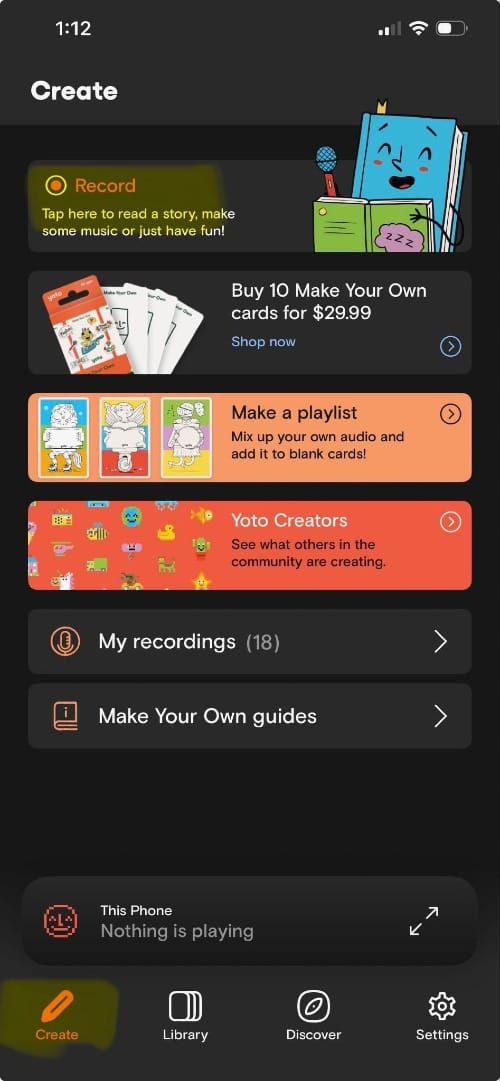
To record, I open the Yoto mobile application, go to the Create tab, and tap Record. When I’m finished, I can go to My recordings to change the title or listen back to each track. So far, I have kept eighteen recordings. I’ll talk about how to create a playlist and upload it to a Make Your Own card below.
Record yourself reading/singing to your kids.
Another thing I have begun to do is record myself reading while I am with my son. We’ve done this with all the For All God’s Children books, which is a lot of fun because Yoto offers a Page turn chime button that my son is always delighted to push. It’s also great fun to hear him “fill in the blank” when we’ve read together and point out the hidden cat on each page. When he listens to these recordings, he can do so with the book in his lap to follow along, or he can listen without it. The other stories I’ve recorded have been what you might call “of the oral tradition”--some that I’ve made up. These are fun to tell and listen back to because they’re spontaneous and totally unserious. In one recording, my wife accidentally interrupts by asking if I can take the trash out. In another, my son forgets I’m telling a story and asks if he needs to get in his jammies. We hear these little bloopers every time we replay the Make Your Own card, but my son still happily declares “it’s the giant gilded saber-claw crab!” at just the right time.
Create a Yoto playlist, add tracks, and upload to the Yoto player.
To record a playlist, here’s what I do. Go to the Create tab and tap Record if you haven’t recorded anything.
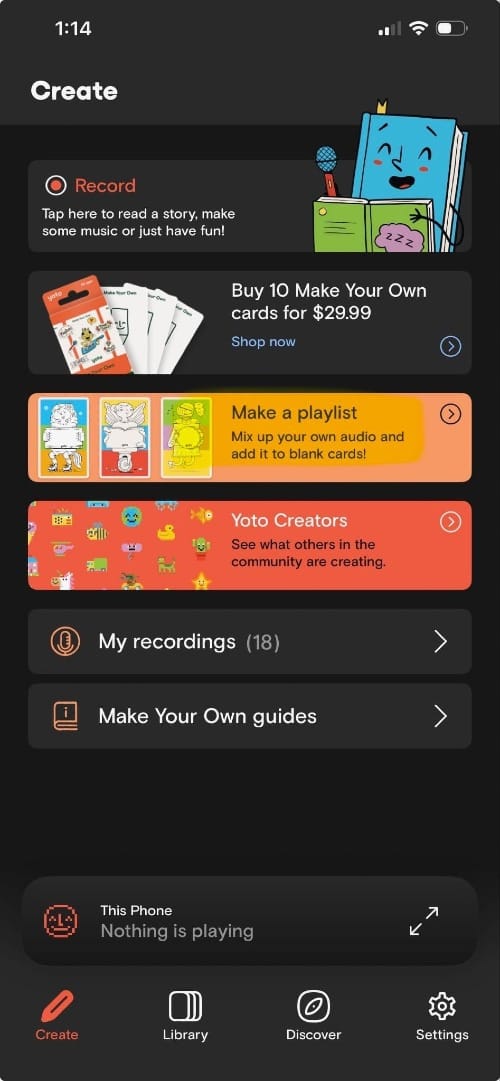
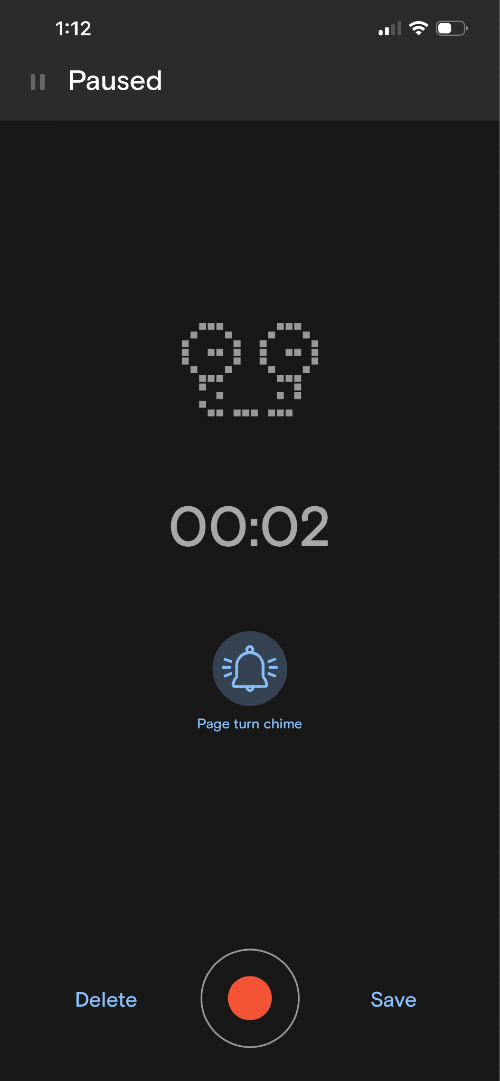
After you have at least one recording, go to the Library tab and tap Make a playlist. After adding a name and a description, you have the option to add recordings from your library, add audio files recorded elsewhere, or add a radio stream.
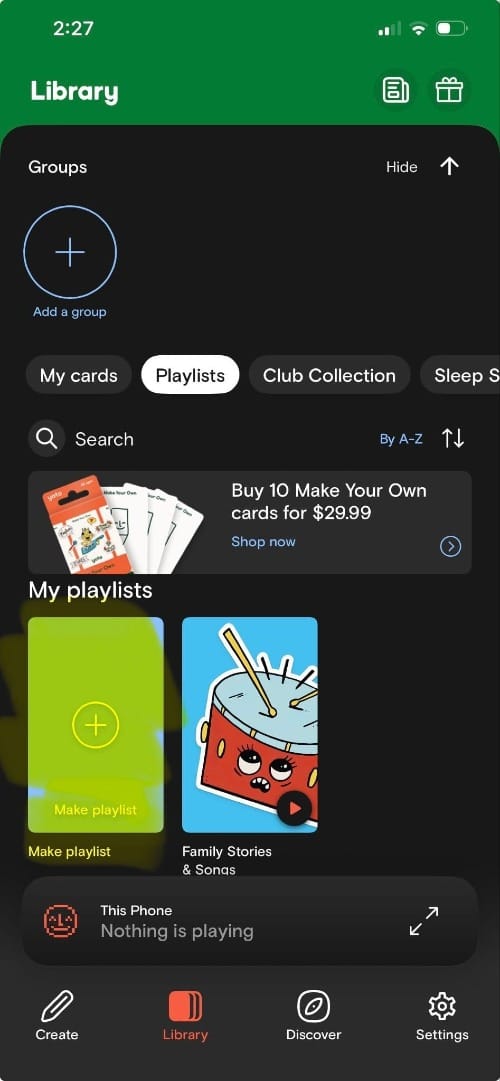
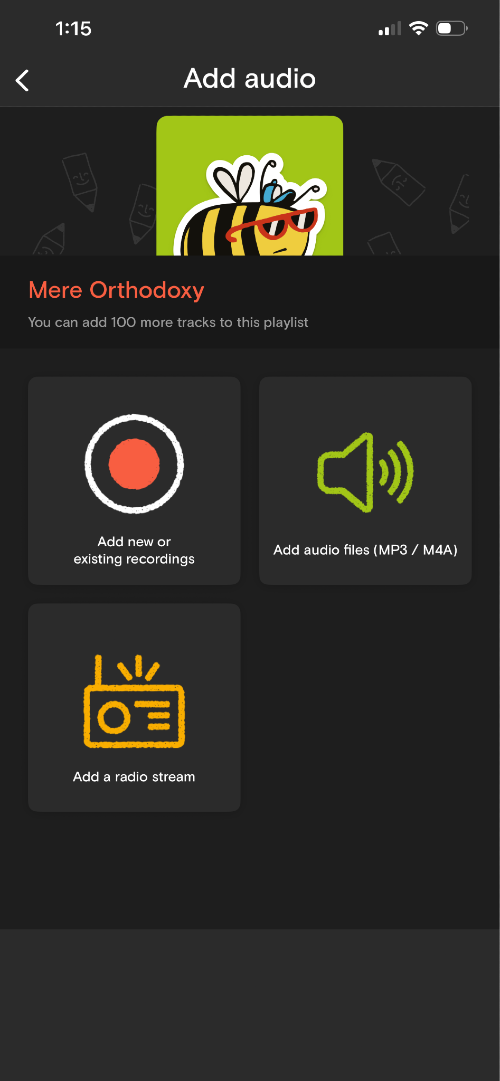
I’ve only ever recorded in the app and added tracks the first way. After you’ve selected the tracks you want to add, tap Create playlist.
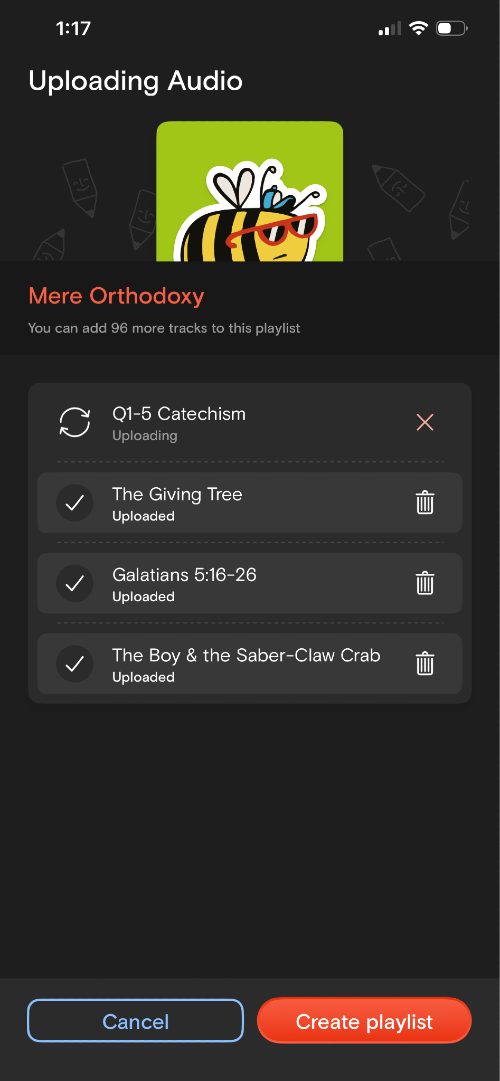
By the way, it’s worth noting that you can add up to 100 tracks to a playlist. I haven’t pushed this to the limit, but one of my tracks is eighteen minutes long and there’s been no indication that tracks are limited by time. When you have a playlist, you can open it up and tap the Link to card button.
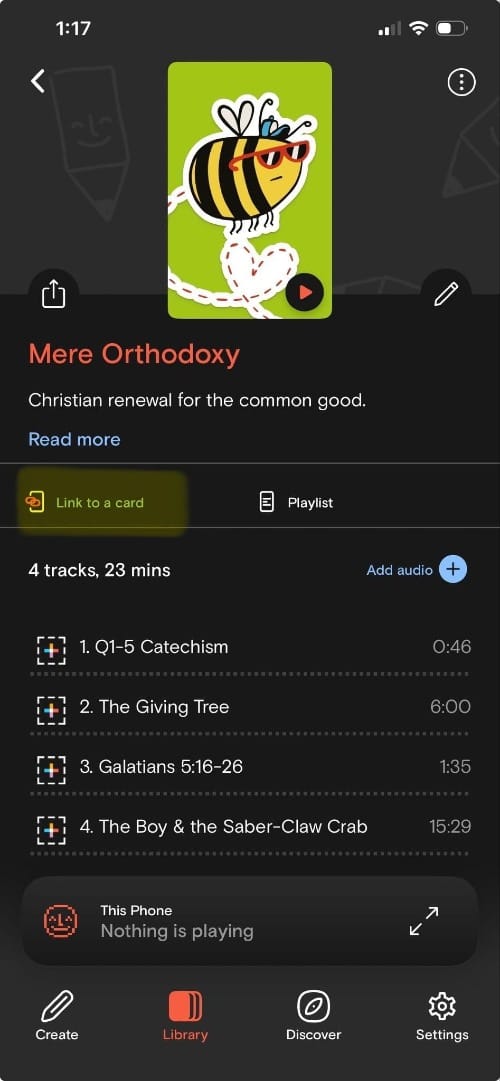
I’ve only used the NFC option, which you can do by tapping Use your phone.
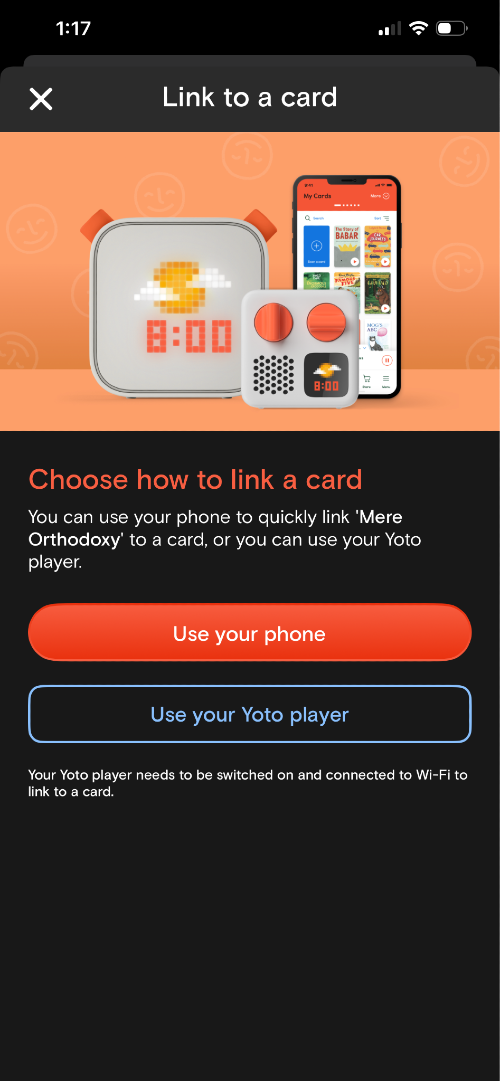
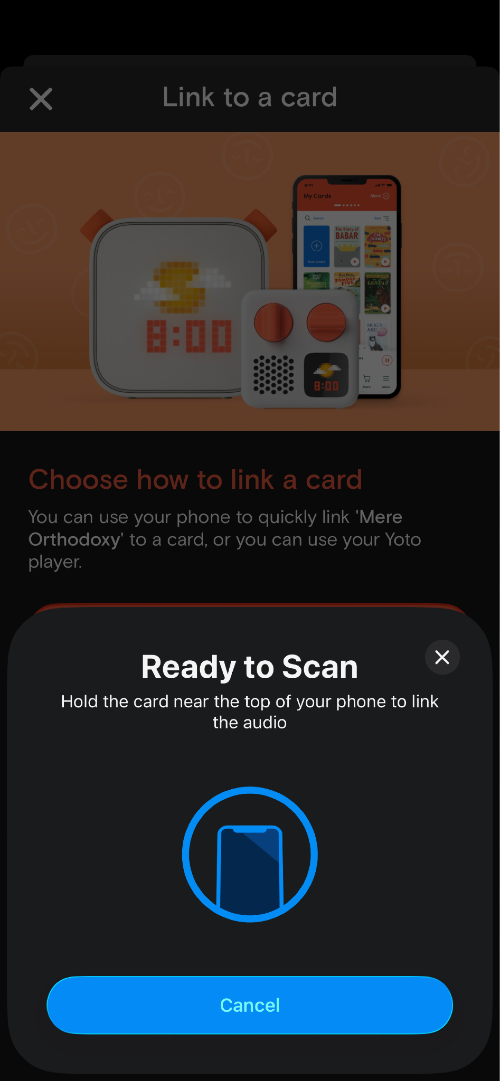
All you have to do then is set your card down and tap it with your phone. When you have your playlist downloaded to your card, you can have the Yoto player download it by leaving the card in the player without any audio playing. I’ve found this process to be really easy, and there are many how-to articles to walk you through anything you may prefer to do differently than I have.
What’s on our Make Your Own card?
- An intro where I say hi to our son, tell him what’s on the card, and tell him I love him
- Jack & the beanstalk
- The hare and the tortoise (Aesop’s Fables)
- Fighting roosters and the eagle (Aesop’s Fables)
- Psalm 23 (Theopolis version, sung)
- David & Goliath (1 Samuel 17, read verbatim)
- Ten Commandments and All God’s Children
- The Ten Commandments
- Apostle’s Creed for All God’s Children
- The Apostle’s Creed
- The Lord’s Prayer for All God’s Children
- The Lord’s Prayer
- The boy and the red shell (a story I made up and tell to my son)
We let our son listen to the Yoto mostly at his leisure during the day. We also let him play the Make Your Own card during his nap and at bedtime because we adjusted the Yoto to turn off after it finishes all the tracks on a card.
The repetition of the Apostle’s Creed, the Ten Commandments, the Lord’s Prayer, and Psalm 23 have been instrumental in our work to collectively memorize the articles of our faith and the songs of the Church. Hearing our toddler “fill in the blanks” as we recite the Creed or sing a psalm together has paid for the Yoto one hundred times over.
It’s a joy and a privilege to stumble through the journey of raising kids, especially as we find what works and what helps. The Yoto has proved itself as a reinforcing tool for catechesis in our home. Making our own recordings forces us to recite the things we are teaching our children. Having a card with his parents’ voices helps our son to know that what he’s hearing is particular to the life of our home.
My wife relayed a story to me that our son picked up a book at home and started “reading her the Bible” and just combined the story of David & Goliath and the Apostle’s Creed. “Giant of Gath! ..and ..and ascended into heaven…” Praise God for the gifts of repetition, imagination, and, yes even devices like the Yoto.
The Weekly Digest
Premier Thought Every Thursday.
All of our recent essays and podcasts, delivered to you. Free.
Free. Delivered Thursday mornings.